Everything between the fridge and the table
Well Stockd connects what you have, what you can cook, what you’ll eat this week and what you need to buy, so none of it drifts out of sync. It sorts what’s closest to its date to the top, so you waste less of what you buy.
See the kitchen before you sign up
These are captures of the app itself, made in a demo kitchen. Each one says whether it’s part of Free or Pro.
Everyday features
A fridge that knows itself
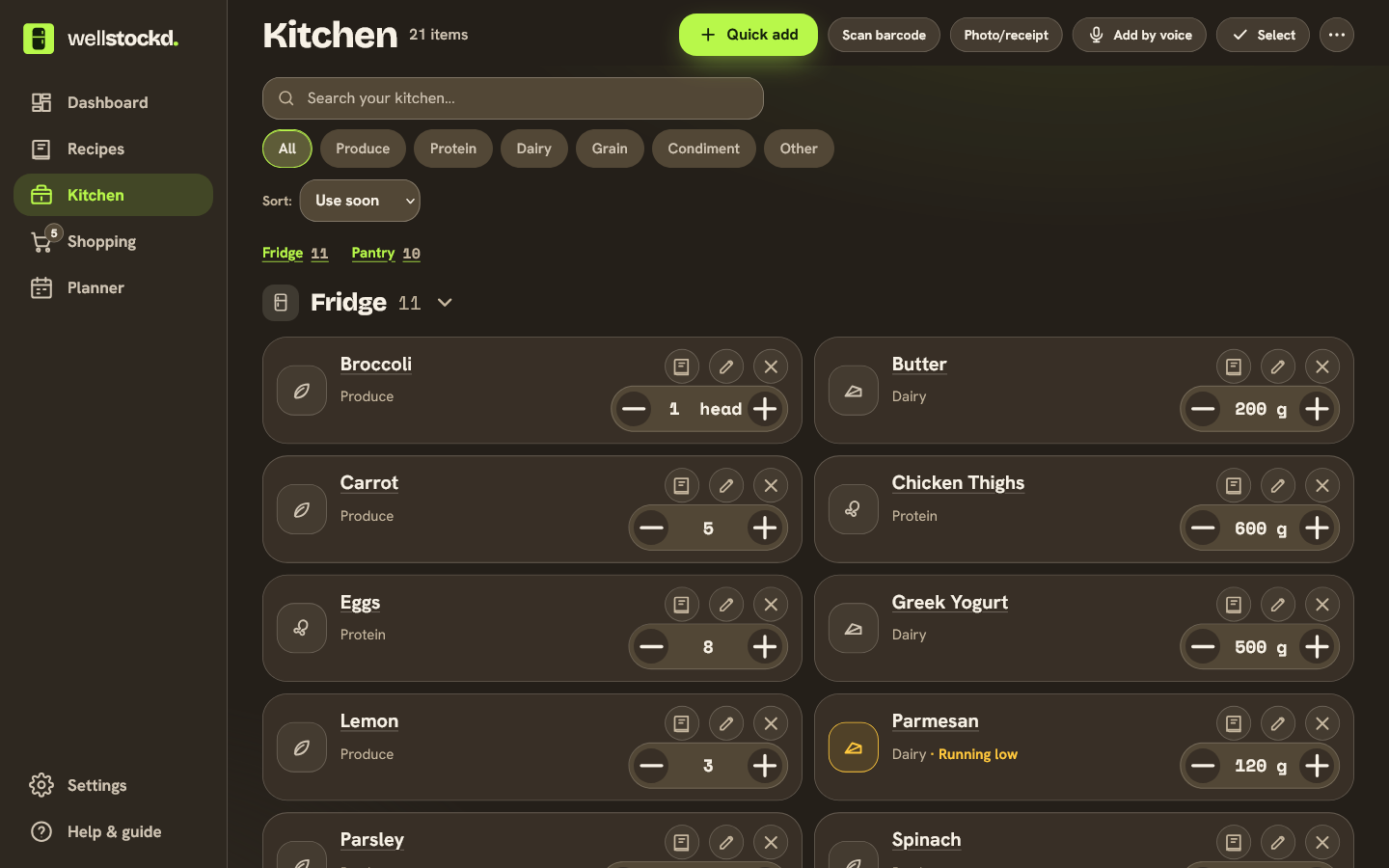
Add what you have by item, quantity and unit, in the fridge, freezer or pantry. Every item gets an estimated expiration date from typical shelf life, so what’s closest to expiring sorts to the top. Canned and frozen food gets no guessed date, and you can always type your own.
- Grouped by where things live
- A “Use soon” list on Home
- Undo on every change
Get it in without typing it all
Scan barcodes one after another and review the batch once. Take a photo of a receipt, or forward a Walmart order or delivery email, a receipt photo or a PDF to your own forwarding address. Each one becomes a draft you check before anything is stocked.
- Batch barcode scanning with one review
- Receipts by photo or forwarded email, from your own verified address
- An order email waits as “ordered, not delivered yet”
Stock it by saying it
Press the mic and say what you see. Well Stockd turns it into items and amounts for you to review before they enter your kitchen. Free has a few voice entries a day; Pro has more.
- Understands “half a gallon”, “a couple cans”, “some basil”
- You approve the list before anything lands
- Works for taking things out, too
A heads-up before food goes off
Well Stockd emails you before something reaches its date: on the day or up to a week ahead, at the hour you choose. Turn on notifications on your phone or computer as well. On Sundays, a short email suggests up to three dinners that use what’s running out.
- On once your email is confirmed
- Phone notifications on Android and desktop; on iPhone, after adding it to the Home Screen
- One-click unsubscribe in every email
See what you can make right now
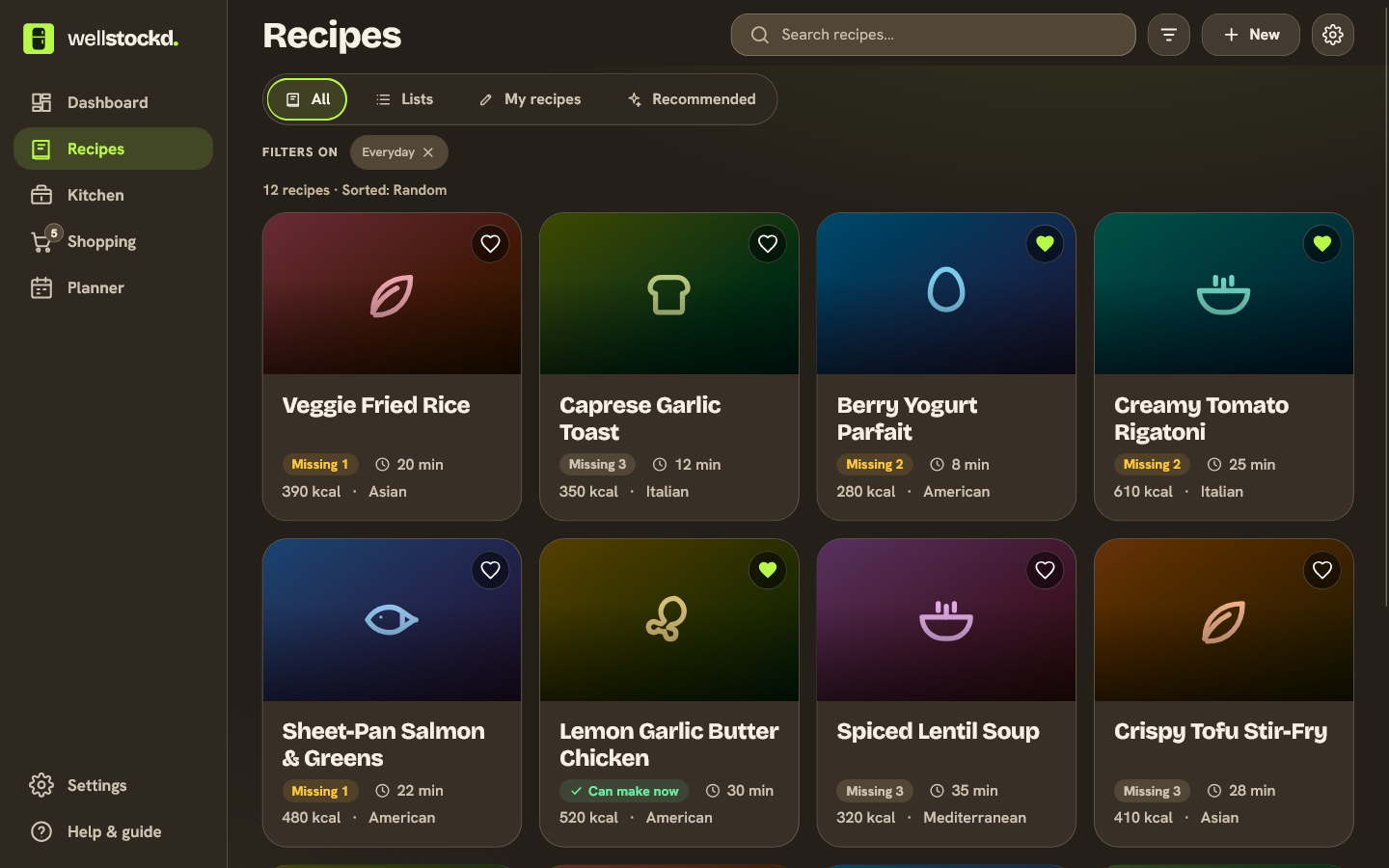
Browse more than 3,800 recipes plus your own. Availability views show what you can make now and exactly what the closest recipes are missing. Shop to cook suggests the few items that would unlock the most meals.
- Two recipe lists on Free.
- Unlimited recipe lists: PRO
- Filter by cuisine, protein, meal, time and calories
- Search by name or ingredient
- Import your own from a link, a photo of a cookbook page, or Paprika and Recipe Keeper files
You decide what counts as a match
Well Stockd suggests swaps, such as buttermilk for milk plus lemon. Auto counts every suggested swap as a match, Manual counts only the ones you approve, and Off stops swaps between different ingredients. Other names for an ingredient, and its frozen or canned form, still count unless you block them.
- Auto swaps: Free.
- Modes, your own pairs and blocking: PRO
- See every swap before you cook
- Lock in or block individual substitutions
- Get doneness tips for the ingredient you actually cook with
Everyone’s rules, checked together
Set a diet (vegetarian, vegan or pescatarian) and the ingredients each person avoids, allergies included. Recipes, the plan and the shopping list follow everyone’s rules at once. These are labels you type, not certified allergen data, so a recipe Well Stockd can’t fully check asks you to confirm it.
- Per person, combined for the household
- Avoid, dislike or swap out an ingredient
- A recipe it can’t verify asks before it counts
Large type, across the kitchen
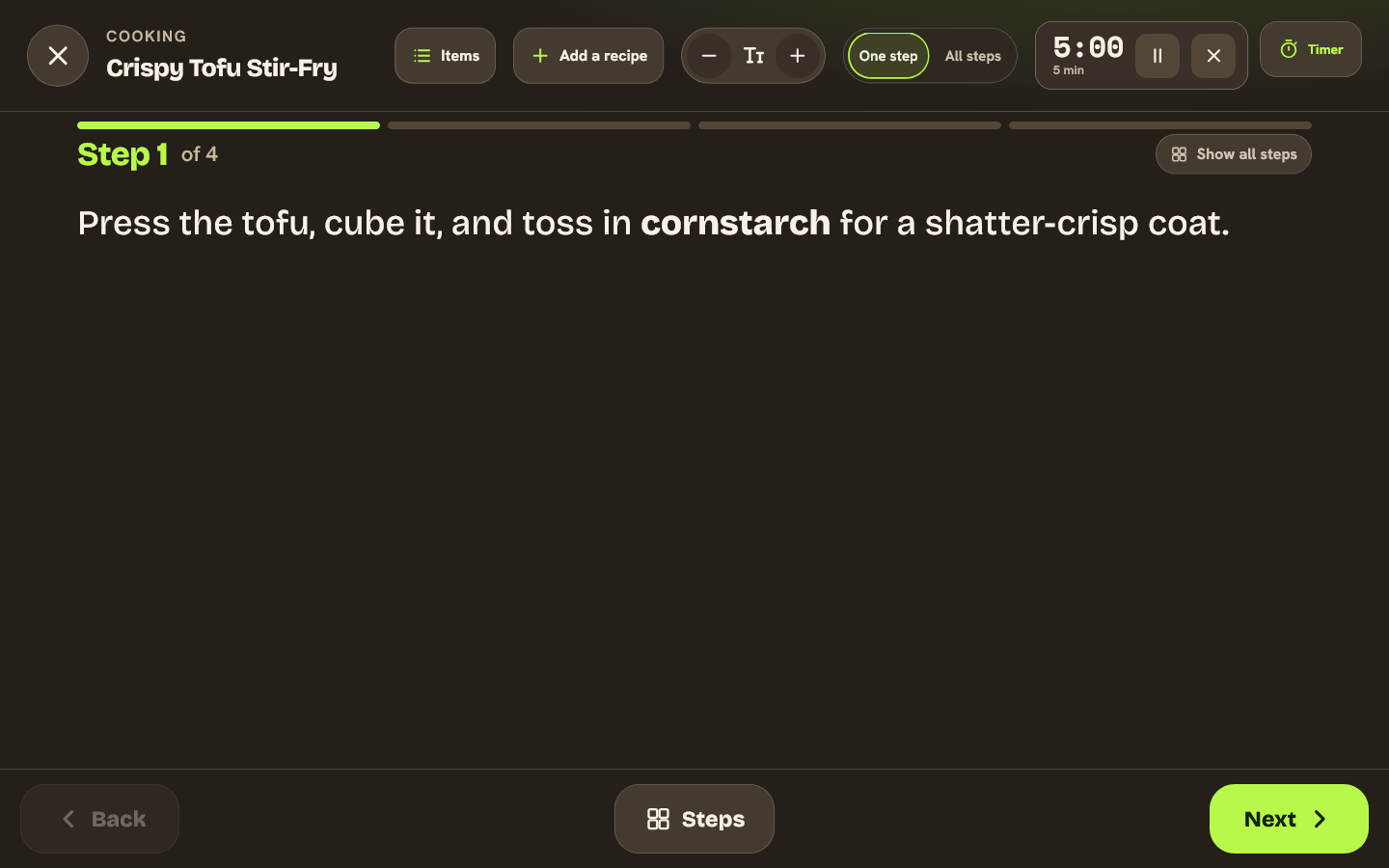
A full-screen, large-type cooking view made for a tablet on the counter. Step through with a tap or swipe, with timers built into the steps and the screen kept awake. Cooking a main and its sides? Open them side by side: every timer is labelled with its recipe, you can set a time to serve as your target, and each recipe finishes on its own.
- Per-step timers with a chime and a buzz
- Several recipes at once, timers labelled by recipe
- Check what you used when you finish, and undo it if you need to
Leftovers and the freezer, counted
When you finish a cook, save what’s left as portions in the fridge or freezer. Put them on the plan for another night without using up the raw ingredients a second time. Frozen portions can send a thaw reminder the evening before.
- Portions based on the servings you made, and you can correct them
- Planned leftovers are held for that meal
- Thaw reminder at 6 PM by default
See what got eaten and what got thrown out
When you remove food, say whether you used it, tossed it, or are just fixing a mistake. Partial amounts count, and every choice can be undone. Your stats count only what you marked used or tossed, and they show money only for food with a price saved from a receipt.
- Used it, Tossed it or Just removing
- “Used half” leaves the right amount behind
- Money figures come only from your own receipt prices
A list that follows your kitchen
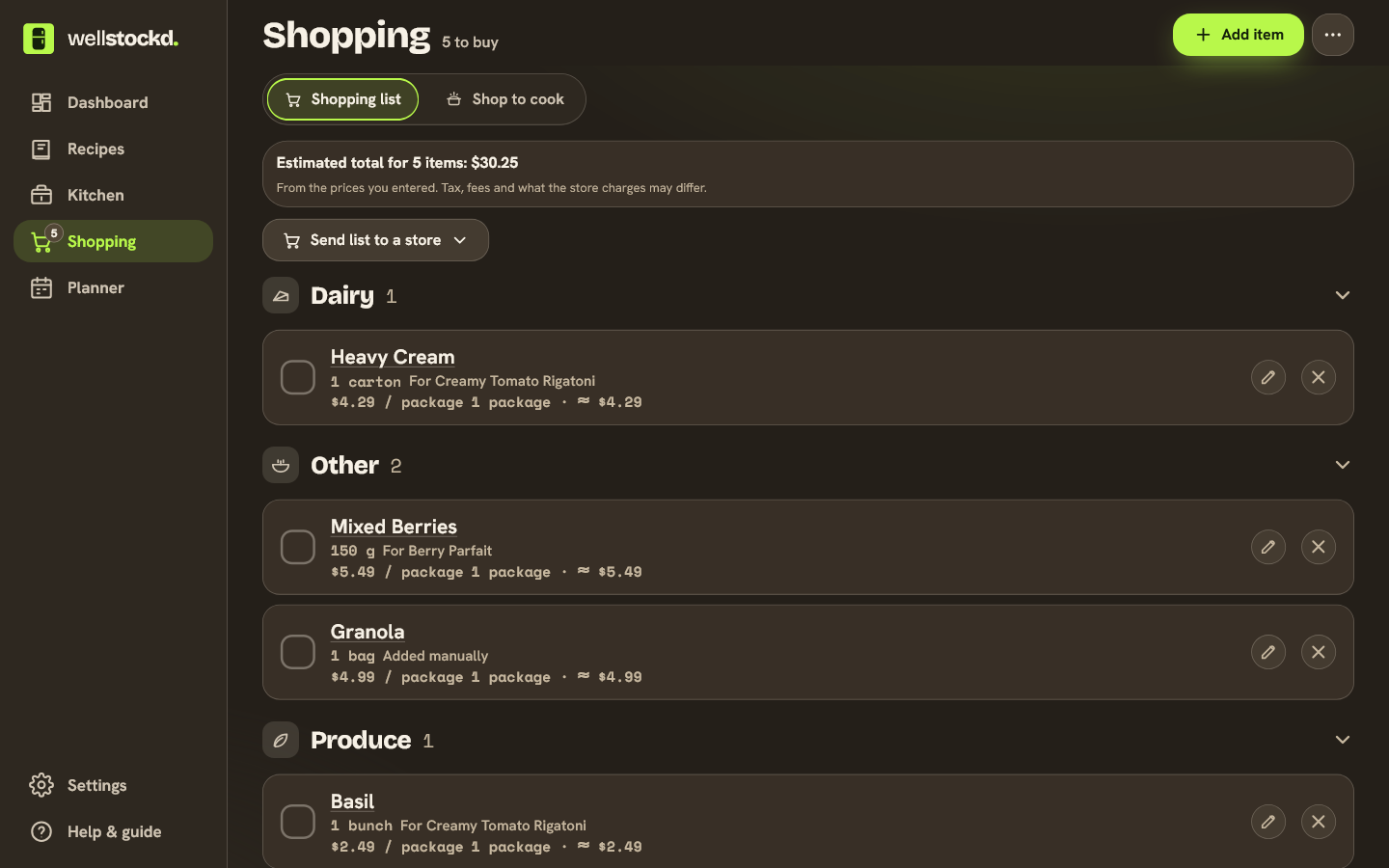
Items land on your list when you run out, cook, or plan a meal. Add a price per package or by weight to see a running estimate, and sort the list in your store’s aisle order. In the store, the list opens and checks off without a signal, then syncs when you’re back online.
- Auto-added from cooking, running out and the plan
- Your aisle order, saved for your kitchen
- Share a separate list with one other person
Send the list to a store, after you check it
Well Stockd matches your list to Walmart products. You check the matches and quantities, then Walmart opens with the cart filled for pickup, delivery or shipping, and you check out there. Put away moves what you bought back into your kitchen.
- Review matched products before anything is sent
- Pickup, delivery or shipping
- Put away what you bought in one step
Install it on the fridge
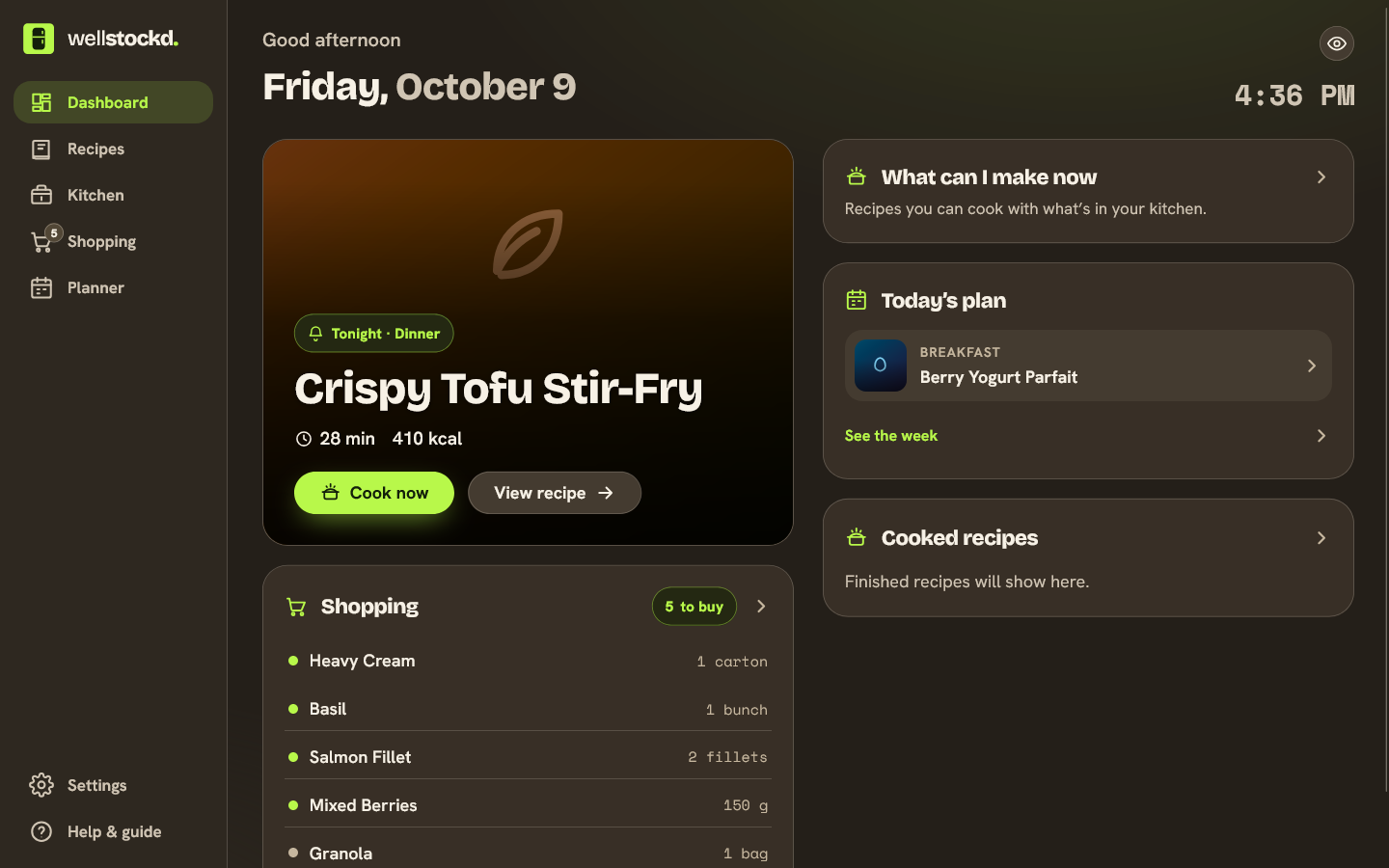
Add it to your home screen and it runs full-screen like a native app. Idle, it turns into a kitchen dashboard with the time, tonight’s dinner and what’s left to buy. Tune the accent, brightness and type to your kitchen.
- Installable home-screen app
- Idle “kitchen panel” dashboard
- Themeable colors, brightness and fonts
Your kitchen, yours to take or delete
Download your recipes with their photos, your kitchen, lists and plan as one ZIP file of CSV and JSON. Recipes other people shared with you come as a name and a link. You can delete your account in Settings, or ask for deletion on the web if you can’t sign in. It usually takes minutes and always finishes within 30 days.
- Export any time, on Free
- Delete in Settings or on the web
- A clear warning before anything is final
Ask ChatGPT, Claude or Gemini about your kitchen
Connect Well Stockd to the assistant you already use. It can read your kitchen, recipes and plan, tell you what you can cook, and add items to your shopping list. Any change to your kitchen waits until you confirm it inside Well Stockd.
- You sign in on wellstockd.com; the assistant never sees your password
- Disconnect in Settings and access stops
- Gemini: US personal accounts, in English
With Pro
Cook with both hands full, and just talk
Turn on voice in cook mode and talk to the tablet like a friend in the kitchen. It reads steps aloud, answers “how much broccoli and what oven temp?”, sets timers, and when you say you’re done it reads back what you used and updates your kitchen, corrections like “I still have half the chives left” included.
- No wake words or commands to learn
- Talk over it to interrupt, or tap
- Before updating inventory, it reads back the changes and waits for your yes
Stock it from a photo
Take a photo of a fridge shelf or the pantry and Pro lists what it can see. You review the list before anything is added. Receipt photos stay Free.
- Review every item before it’s saved
- No dates or allergens guessed from the photo
- Edit names and amounts in the review
Plan the week, or the next eight
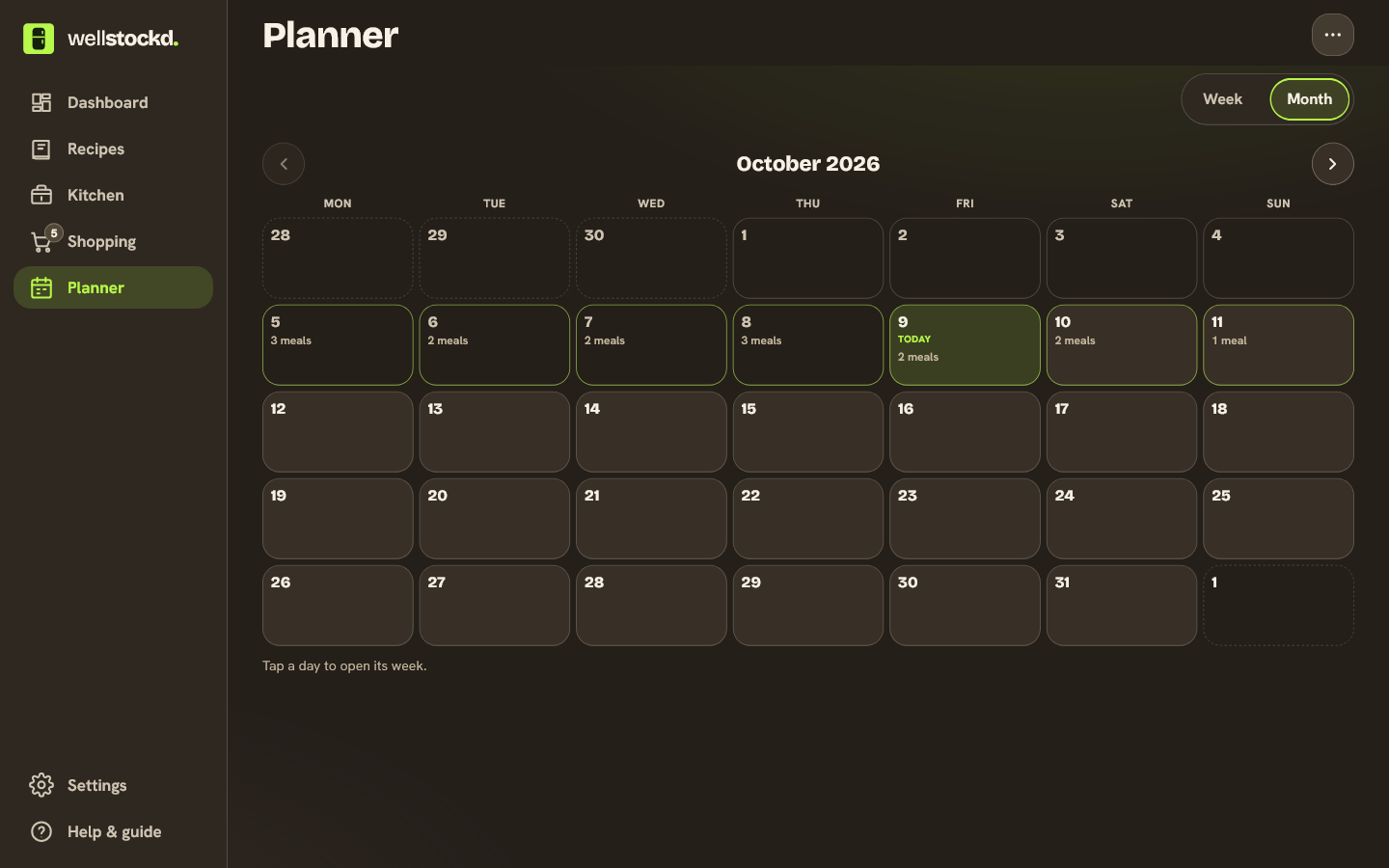
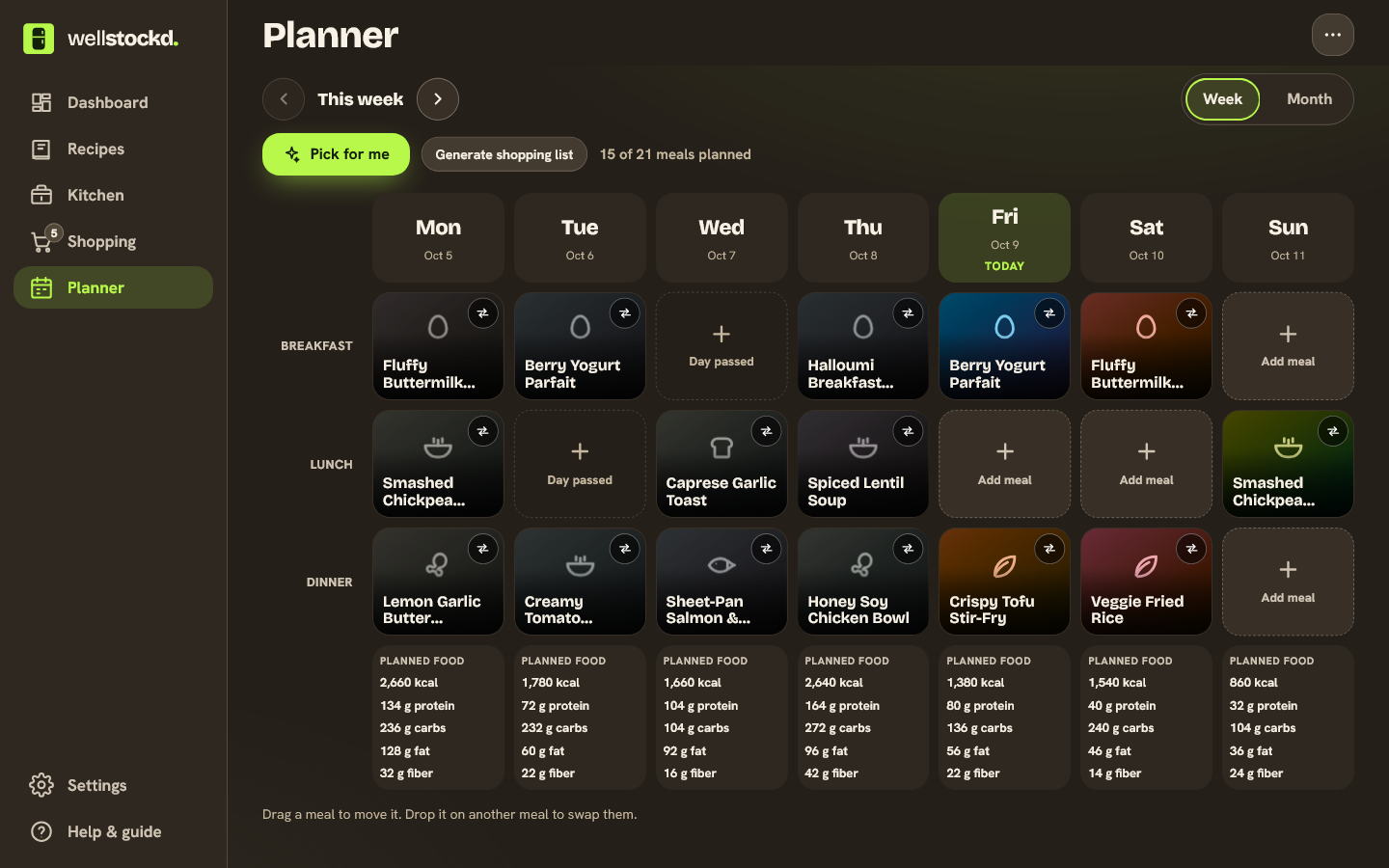
Put recipes on a Monday-to-Sunday plan with breakfast, lunch and dinner. Move a meal by dragging it, or with buttons or the keyboard; drop it on a taken slot and the two swap. Each day shows nutrition totals for the food you planned, and anything without nutrition data is marked incomplete rather than counted as zero. Free plans the current week by hand. Pro plans up to eight weeks ahead, adds a month view, saves weeks your household can reuse, and writes the shopping list from the plan.
- Per-meal servings, kept when meals move
- Diet rules still apply when you move meals
- Feeds the shopping list on Pro
A week of meals from what you have
Open Pick for me in the planner and choose With AI. It picks from the recipe catalog and your own recipes, uses what’s already in your kitchen first, and says why it chose each one. Add a grocery budget if you like: it adds up what you still need to buy, rounded to real package sizes, and lists anything it has no price for instead of claiming you’re under budget. Your diet rules are checked again before anything is saved.
- Only real recipes, never invented ones
- Budget covers groceries to buy, before tax and fees
- Without AI, it picks by fixed rules and uses no AI allowance
One kitchen, everyone’s in it
Create a household and share its code. Up to six people cook from the same kitchen, plan and shopping list, with everyone’s favorites together in one Family tab.
- Shared family favorites
- One invite code to join
- Works on every device at once
Need a hand?
- How do I add what I have?
- Open Kitchen and add items by name, quantity and unit, scan barcodes, read a receipt, or press the mic and say what you see.
- How do I get a receipt email in?
- Forward it from your account’s email address to your forwarding address, which you’ll find in Settings. It waits in Receipts to review until you check it.
- How do I find something to cook?
- Open Recipes and pick an availability view, such as what you can make now.
- How do I change which swaps count?
- In a recipe, look over the swaps before you cook. Auto counts every suggested swap, Manual counts only the ones you approve, and Off stops swaps.
- How do I download or delete my data?
- Open Settings. Export gives you one ZIP file. Delete account explains exactly what happens before you confirm.
For account or product help, email support@wellstockd.com.
Ready to cook from what you’ve got?
Free forever · Pro $7.99/mo or $79/yr · 7-day free trial
Comparing apps? Our guide to choosing an app to track food expiration dates puts eight side by side, Well Stockd included.