Grocery list app that sorts by aisle: shop your store in one pass
How Well Stockd, AnyList, OurGroceries, Fango and Deglaze sort a grocery list by aisle: custom orders, a layout for each store, Walmart and Kroger carts, and price.
A grocery list app that sorts by aisle groups your list in the order you walk the store. Well Stockd is our pick: set the aisle order once, and the list can go to a Walmart or Kroger cart you check first. AnyList is the runner-up for custom categories.
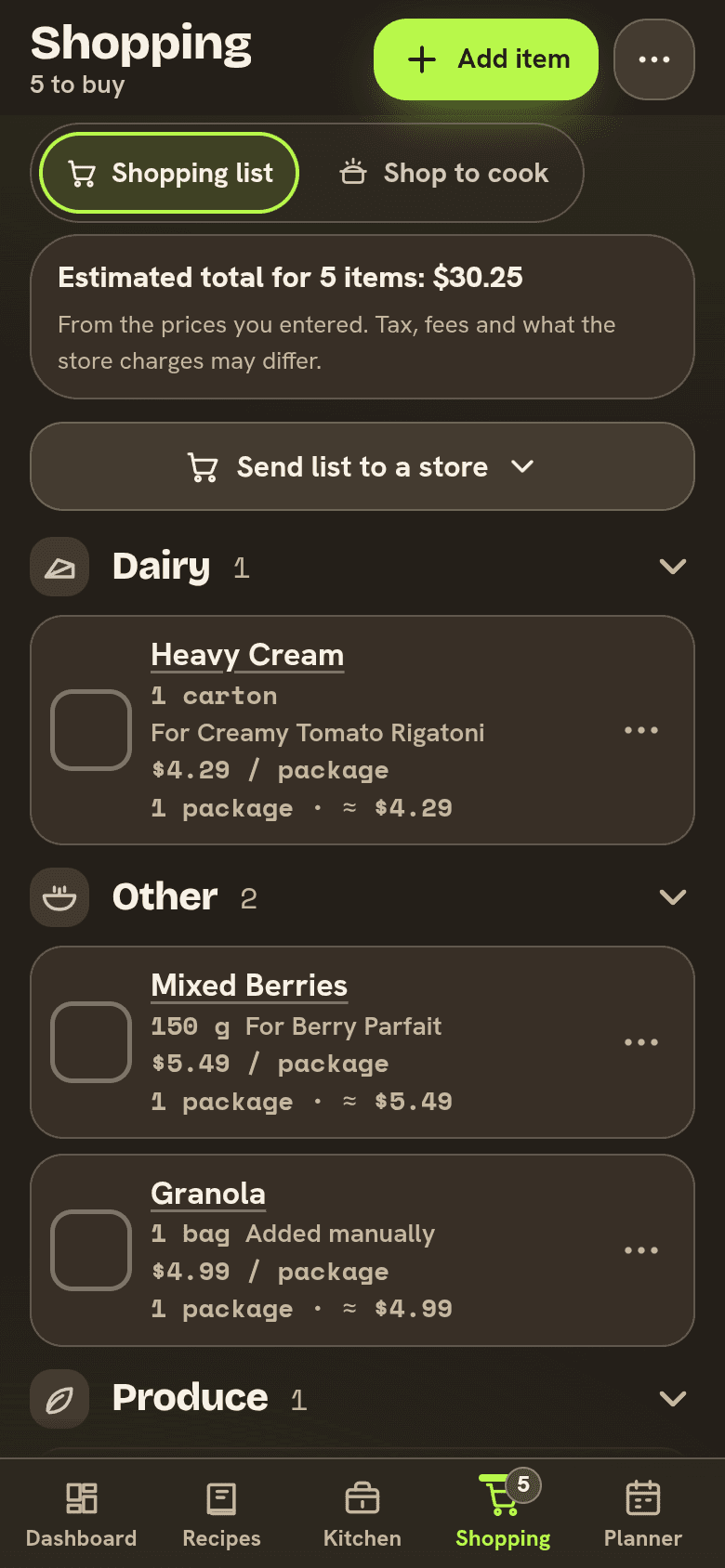
An unsorted list costs you laps. You get the milk at the back of the store, walk to produce for onions, then find butter on the list and walk back. A list grouped in your store's order turns that into one pass.
Most list apps can group items by type. Fewer let you put those groups in the order of your store, fewer still keep a different order for each store, and only some send the finished list to a store's own cart.
How we compared
We read each app's own website, help pages and App Store listing on November 3, 2026. For each one we noted how items get grouped, whether you can reorder the groups or add your own, whether each store can have its own order, where the list can be sent, and what it costs. We did not walk the same store with every app, so where a page doesn't say something, we say that.
Grocery list apps that sort by aisle at a glance
| App | How the list is grouped | An order for each store | Send to a store | Price |
|---|---|---|---|---|
| Well Stockd | Nine food groups you put in your store's order | On Pro, up to 12 stores | Walmart and Kroger carts; Amazon Fresh as a list | Free; Pro adds stores (plans) |
| AnyList | Categories you can add, rename and reorder | Yes, with category sets for each store | Walmart, Kroger, Instacart and more, in its phone apps | Free; Complete $9.99 a year, or $14.99 for a household |
| OurGroceries | Categories you can add and reorder | No, categories are the same across lists | Instacart | Free with ads |
| Fango | 13 aisles in the order you walk the shop | Its page doesn't say | Its page doesn't say | One month free, then a subscription priced in the app |
| Deglaze | Sorted by grocery aisle on Pro | Its listing doesn't say | Its listing doesn't say | Free; Deglaze Pro $49.99 in the app |
Well Stockd: your aisle order, and a cart when you want one
We make Well Stockd, so weigh our ranking with that in mind. Here is what it does today, and where it falls short.
Choose Group by store aisle and the list splits into nine food groups: Produce, Dairy, Protein, Grain, Pantry, Condiment, Spice, Nuts and Other. Until you set an order they run A to Z. Arrange store aisles asks you to "put the aisles in the order you walk through your store", one tap up or down at a time, and Reset to the usual order puts them back. The order is saved for your kitchen, so everyone who shares it shops in the same order. Within a group, you can drag an item up or down.
On the free plan you get one aisle order and two shopping lists. Pro adds Stores: up to 12 stores, each with its own aisle order, and a list tied to a store follows that store's order. Pro also lifts the list limit.
The list fills itself, too. Items land on it when you run out of something, cook, or plan a meal. You can add a price per package or by weight to see a running total, and in the store the list opens and checks off without a signal, then syncs when you're back online.
When you'd rather not walk the aisles at all, the same list can go to a store. Walmart: Well Stockd matches each item to Walmart products, with alternates to swap in, and you pick a store by ZIP code for pickup or delivery, or skip that for shipping. Once the matches look right, Walmart opens with the cart filled, and you check out there. Kroger: connect your Kroger account once, choose a store to search, pick a product, quantity and pickup or delivery for each item, and they go into your own Kroger cart. Both carts are on the free plan. For Amazon Fresh or Whole Foods Market, the list opens on Amazon to review, without a filled cart. Our meal planner with a Walmart or Kroger cart page walks through each one. After the shop, Put away moves what you bought back into your kitchen, which holds up to 30 foods on the free plan.
Where it does not win:
- The nine groups are fixed. You can't add a Frozen or Bakery group, or rename one to "Aisle 7". AnyList and OurGroceries both let you add and rename categories.
- One aisle order on the free plan. If two stores you use are laid out differently, a separate order for each is Pro.
- Carts go to Walmart and Kroger only, and Amazon gets a list rather than a cart. AnyList reaches more stores, including Instacart, Safeway, Albertsons and H-E-B.
- Well Stockd can add items to your Kroger cart but can't take them out, and product matches can be wrong or out of stock, which is why you check each one.
- It doesn't compare prices between stores or show coupons.
Set your store's aisle order once, and every list after that walks the store with you. Start the free trial
AnyList: categories you can shape to any store
AnyList is the strongest app here for aisle sorting on its own. Its help pages show how to add a category, reorder categories with a drag control, remove one, or rename it and change its icon. Category sets go further: "you could create a category set for each store you shop at with each set containing categories that match the aisle layout at that store", and an item can sit in a different category in each set. Switching sets quickly with a filter, or tying a set to a store filter, is part of AnyList Complete.
AnyList also shops your list online "with many retailers & services, including Instacart, Walmart, Kroger, Safeway, Albertsons, Amazon Fresh, and H-E-B." You step through the list one item at a time, pick a search result and add it to the cart, then check out. That's in its iPhone and Android apps, in the US only. Complete is $9.99 a year for one person or $14.99 for a household. We covered the rest in our AnyList alternatives guide.
OurGroceries: one category order for every list
OurGroceries groups items by category and "guesses what category each new item should be in." You can add your own categories, change the ones it starts with, and rearrange them into the order you visit the store. You can also drag single items. Its guide is honest about the limit: "categories are the same across all shopping lists", so aisle numbers as categories "works best if you do most of your shopping at the same store." Shop on Instacart sends a list for delivery after you choose brands and sizes, in the US and Canada. OurGroceries is free with ads, and an upgrade removes them.
Fango: 13 aisles and a shop mode
Fango's shopping list says "items sort themselves into 13 aisles in the order you walk the shop." In shop mode the rows get large and a bar shows how much is left to find, and you can set a budget for the whole shop. The list suggests what you buy regularly and what's running low, based on your old receipts and what's in the fridge, and up to four people share one subscription. Fango runs on iPhone and Android, free for a month and then a subscription priced in the app.
Deglaze: aisle sorting on Pro
Deglaze is a recipe app first. Its App Store listing says you can add items by hand or add entire recipes with one tap, and that "your list is auto-categorized by grocery aisle" on Deglaze Pro. A household shares one list, and one Pro subscription covers the household. Deglaze Pro is an in-app purchase listed at $49.99.
Which aisle-sorting grocery list app should you pick
| If you want | Pick |
|---|---|
| A list that fills from your kitchen, sorts in your order, and goes to a Walmart or Kroger cart | Well Stockd |
| Categories you can rename, with a different layout for each store | AnyList |
| One shared list in a fixed category order, free | OurGroceries |
| Automatic aisles and a shop mode with a budget | Fango |
| Recipe ingredients sorted by aisle | Deglaze |
How to set your aisle order in ten minutes
You don't need a store map. Next time you shop, note the order you pass through the sections, or picture your usual route from the door. Many stores put produce near the entrance and dairy along a back wall, but yours may not, which is the whole point of setting it yourself.
Then put cold food last. Even if the freezer cases come early on your route, grab them at the end so the ice cream isn't melting by the checkout. If you shop at two stores with very different layouts, keep a separate list for each rather than fighting one order.
Finally, keep the list honest. A sorted list only saves time if it has everything on it, so add things the moment you run out. Our guide to a grocery list app that knows what you already have covers that part. If you're on Google Keep today, see how far a Google Keep grocery list goes with aisle order. And once food is home, the apps that track food expiration dates keep it from going to waste.
Build the list from your kitchen, sort it by your aisles, and send it to a cart when you'd rather not go. Start the free trial
Frequently asked questions
Which grocery list app sorts by aisle?
Well Stockd, AnyList, OurGroceries and Fango all group a list by aisle or category. Deglaze sorts its list by grocery aisle on Pro.
Can I set the aisle order for my own store?
Yes. Well Stockd lets you put its nine food groups in the order you walk your store, and on Pro you can keep a separate order for each of up to 12 stores. AnyList and OurGroceries let you reorder categories, and AnyList's category sets give each store its own layout.
Is there a free grocery list app that sorts by aisle?
Well Stockd's free plan includes one aisle order for your kitchen and two shopping lists. OurGroceries is free with ads, with categories you can reorder. AnyList is free to start, with Complete as an optional upgrade.
Can I send my grocery list to Walmart?
Well Stockd matches your list to Walmart products, lets you check each match, then opens Walmart with the cart filled, on the free plan. AnyList shops Walmart from its phone apps, one item at a time.
Can a grocery list app add items to my Kroger cart?
Yes. Well Stockd adds the products you pick to your own Kroger cart once you connect your Kroger account, and AnyList supports Kroger and Kroger-family stores in its phone apps. Well Stockd can't remove items from the Kroger cart, so do that on Kroger's site.
Sources:
- AnyList: compare features
- AnyList Complete
- AnyList help: add, reorder, rename or remove categories
- AnyList help: category sets
- AnyList help: online grocery shopping
- OurGroceries user guide
- OurGroceries FAQ
- Fango: shopping list, household and pricing
- Deglaze on the App Store
Competitor details checked November 3, 2026.