Recipe to grocery list app: turn any recipe into a shopping list
How Well Stockd, Paprika, AnyList, Samsung Food, Cookpad and Crouton turn a recipe into a shopping list: pantry checks, servings, combined amounts, store carts and price.
A recipe to grocery list app copies a recipe's ingredients onto your shopping list in a tap or two. Well Stockd is our pick, because it adds only what your kitchen is short of at the servings you are cooking. Paprika is the runner-up if you would rather pay once.
Most recipe apps can send ingredients to a list. Where they differ is what happens next. Does the app know you already have rice? Does it add the right amount when you cook for six instead of four? And when two recipes both need eggs, do you get one line or two? Get those wrong and you come home with a third bag of onions.
This guide is about that step, from one recipe or a week of them to the list. If what you want is a list that follows your pantry over time, our comparison of grocery list apps that track what is already in your kitchen covers that side.
How we compared
We read each app's own website, help pages and App Store listing in November 2026. For each one we noted how ingredients get from a recipe to the list, whether the app leaves out what you have, whether the list follows the servings you choose, whether the same ingredient from two recipes ends up on one line, and what the app costs. We did not run the same recipes through every app, so where a page is vague we say so rather than guess.
Recipe to grocery list apps at a glance
| App | From recipe to list | Leaves out what you have | Combines the same ingredient | Price |
|---|---|---|---|---|
| Well Stockd | An "Add missing" button, or a sheet listing every ingredient | Yes, by amount, from your kitchen list | Yes, when the units match | Free; the plan writing the list is Pro (plans) |
| Paprika | Tap the cart, then check or uncheck each ingredient | Pantry items start unchecked | Yes: "1 egg + 2 eggs = 3 eggs" | $4.99 on iPhone and iPad; each platform sold separately |
| AnyList | Tap ingredients to add them | Not described; you choose | Not stated | Free; Complete $9.99 a year, or $14.99 for a household |
| Samsung Food | "One click" from a recipe or meal plan | Not stated; Food+ keeps a pantry food list | Not stated | Free; Food+ $59.99 a year or $6.99 a month |
| Cookpad | From your weekly menu | "You only add what's missing"; how it knows is not stated | Not stated | Free with no ads; Premium as an in-app purchase |
| Crouton | Copy just the ingredients you need | You choose | Not stated | Free; Crouton Plus $24.99; Apple devices only |
Well Stockd: the list starts from what is in your kitchen
We make Well Stockd, so weigh our ranking with that in mind. Here is what it does today, and where it falls short.
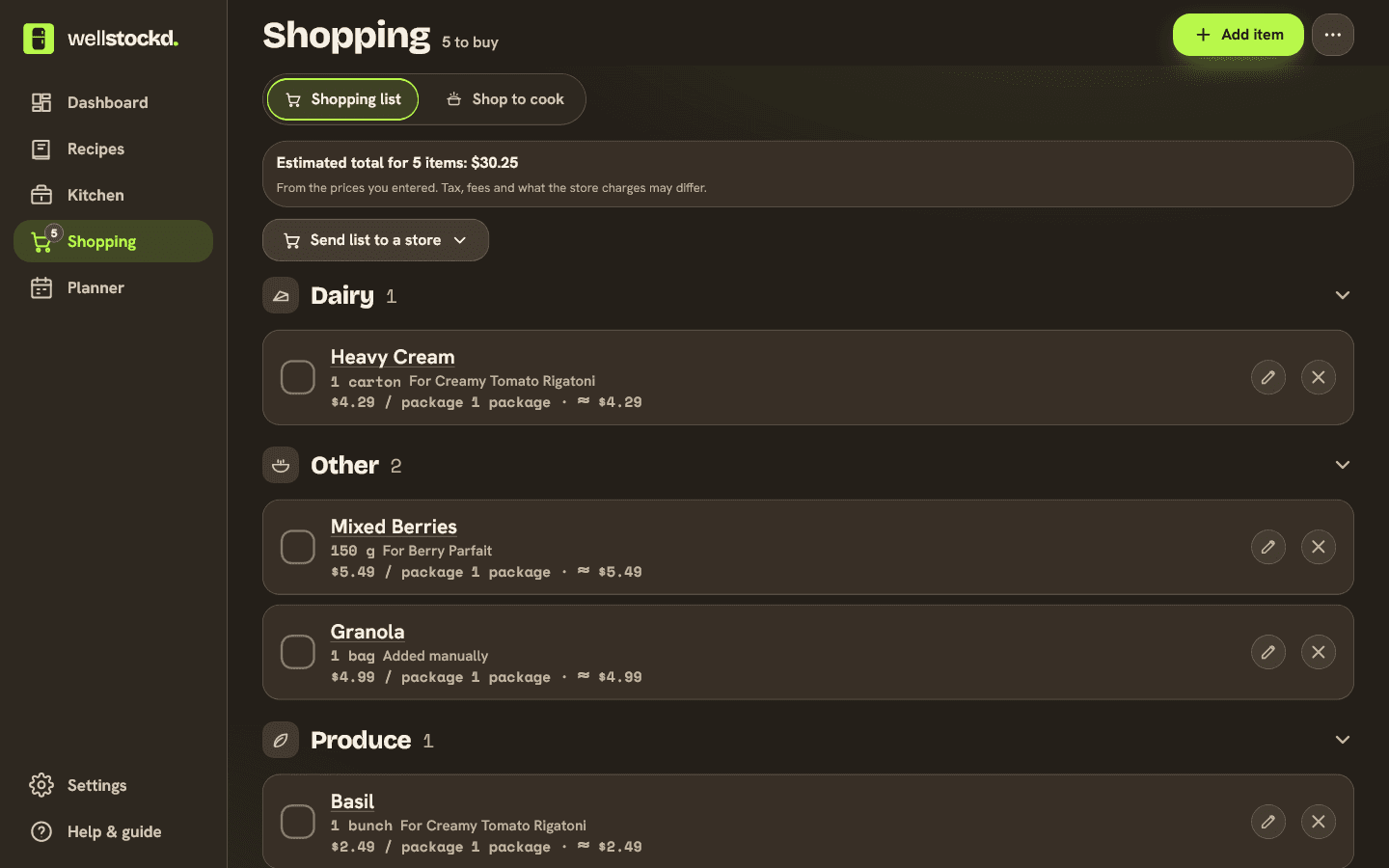
Well Stockd keeps a list of what is in your fridge, freezer and pantry, and every recipe is checked against it. Open a recipe, set the servings, and the button tells you how many items you lack, for example "Add 3 missing to shopping list". Tap it and those items go on the list at the amount you are short. If you have 1 cup of rice and the recipe needs 3 cups at the servings you chose, 2 cups go on the list. When the units can't be compared, the recipe's full amount goes on instead.
If you want to choose, open Add to shopping list. It shows every ingredient marked In your kitchen, Missing or On the list, with what you are short of already checked. Tick anything else you want, pick which list it goes to, and add it. Salt, black pepper, water, cooking spray and plain cooking oil count as on hand, and the Ignore missing seasonings filter stops a missing spice from counting against a recipe.
Cooking two recipes that both need eggs? Add the second one and the amounts add up on one line: 2 eggs and 2 eggs become 4. Amounts in different units sit side by side, such as 1 cup + 2 tbsp. Each item remembers which recipe it came from, so you can group the list by food type or by recipe, and a recipe whose missing items are already on the list says "Missing items already listed" instead of adding them twice.
On Pro, the meal planner writes the list for the whole week from the meals you planned, leaving out what you have, and you can untick anything before it is added. On Free you add recipes one at a time, which is quick enough for a few dinners. In the store the list follows your aisle order and checks off without a signal. You can also send the list to a Walmart or Kroger cart after checking each matched product, on Free too.
The catch is the kitchen list itself. The app can only leave out food it knows about, so the list is only as good as your kitchen count. Barcode scans and receipt photos fill it in, and finishing a recipe in cook mode takes out what you used. The free plan holds up to 30 foods in your kitchen; Pro lifts the limit.
Where it does not win:
- If you don't keep the kitchen list, it will add food you already own, like any other app.
- Thirty foods fill up fast in a stocked pantry, so a big kitchen needs Pro.
- The plan writing the week's list, and separate aisle orders for named stores, are part of Pro.
- Amounts in different units are shown side by side, not converted.
- It is a web app you add to your home screen, with no Apple Watch app or Reminders link. Crouton has both.
Pick a recipe, set the servings, and see what you actually need to buy. Start the free trial
Paprika: the closest match, paid once
Paprika's user guide describes almost the same step. Tap the cart on a recipe and a pop-up lists its ingredients, so you can "check/uncheck ingredients before they are added to the grocery list." The guide adds: "Ingredients you have added to your Pantry will be automatically unchecked for you." The home page says the grocery list is "automatically sorted by aisle" and that "Similar ingredients will also be combined: 1 egg + 2 eggs = 3 eggs." You can keep several grocery lists, and recipes scale to your serving size.
The guide describes the pantry check by ingredient: anything in your Pantry starts unchecked. It does not say the app compares amounts, so for a double batch, check the quantities yourself. Paprika is $4.99 on iPhone and iPad, and "each version of Paprika is sold separately", so a phone and a computer means two purchases. Our guide to Paprika's alternatives and what they cost goes further.
AnyList: the simplest shared list
AnyList is a shopping list first. On a recipe you "simply tap on ingredients to add them to your shopping list", and the list "automatically groups items by category". Share it, and "any changes made to a shared list will show up instantly to everyone sharing the list", which is why couples who split the shopping like it. AnyList's pages describe no check against what you have at home, so you decide which ingredients to tap.
AnyList Complete, at $9.99 a year for one person or $14.99 a year for a household, adds saving recipes straight from websites, recipe scaling, prices with a running total, and a meal planning calendar where you can "add some or all of the ingredients for upcoming recipes to your shopping list." Our breakdown of AnyList's free and Complete plans covers the rest.
Samsung Food: one click, and a pantry on Food+
Samsung Food's home page says you can "instantly turn any recipe or meal plan into a smart shopping list with one click," then take the list to the store, check out online, or share it. Saving recipes from any website, meal plans and shopping lists are all on the free plan.
Food+, at $59.99 a year or $6.99 a month after 7 days free, adds an "Automated pantry food list" and a recipe search that favors "soon-to-expire items from your Food List", both on the mobile app only. Samsung's pages don't say whether the shopping list leaves out what is on your Food List, so check before you count on it.
Cookpad: a weekly menu that writes the list
Cookpad's App Store listing says you can "build your weekly menu in a few taps and let your shopping list build itself from your recipes: you only add what's missing." It imports recipes from websites, Instagram and TikTok, or from a photo of a cookbook page, and it shows no ads, "not even in the free version." Premium adds "Import unlimited recipes", so free imports have a limit, which the listing doesn't give. The listing also doesn't say how the app decides what is missing, so plan on trimming the list yourself.
Crouton: for a kitchen that runs on Apple
Crouton's listing says you can "create shopping lists directly from your recipes, easily copy just the ingredients you need to your list," and that it "integrates with Reminders", so the list can live in Apple's Reminders app. It runs on iPhone, iPad, Mac, Apple Watch and Apple Vision Pro and syncs through iCloud. It is free to download, with Crouton Plus at $24.99 among its in-app purchases. The listing covers Apple devices only, and you pick the ingredients yourself.
Which recipe to grocery list app should you pick
| If you want | Pick |
|---|---|
| A list that leaves out what your kitchen has, by amount, on a free plan | Well Stockd |
| A one-time purchase with a pantry check and aisle sorting | Paprika |
| A list your partner sees change the moment you tap | AnyList |
| One click from a meal plan, with nutrition tracking on Food+ | Samsung Food |
| Recipes saved from Instagram and TikTok, and a weekly menu | Cookpad |
| Everything in Apple's Reminders | Crouton |
How to turn a week of recipes into one list without overbuying
Set the servings before you add anything. A recipe for four cooked for six needs half as much again, and an app that scales the list does that sum for you.
Then add the week's recipes one at a time, or from the plan, and let the app put repeats on one line. Read the list once before you leave. Small amounts become whole packages at the store, so 2 tbsp of tomato paste is one can, and you may already have the open one in the fridge door. Sort by aisle, and go.
If the list keeps growing anyway, our habits that keep a grocery list from growing help. And the cheapest food is the food you already bought, so the apps that track food expiration dates are worth a look too.
Add your next recipe and let the list skip what you already have. Start the free trial
Frequently asked questions
What is the best app to turn a recipe into a grocery list?
For a list that leaves out what your kitchen has, at the servings you are cooking, Well Stockd. For a one-time purchase with a pantry check and aisle sorting, Paprika. For the simplest shared list, AnyList.
Is there a free recipe to grocery list app?
Yes. Well Stockd, AnyList, Samsung Food, Cookpad and Crouton all let you send a recipe's ingredients to a list for free. Well Stockd's free plan also checks each recipe against your kitchen, which holds up to 30 foods on Free.
Can an app combine the same ingredient from two recipes?
Paprika says so on its home page: "1 egg + 2 eggs = 3 eggs." Well Stockd adds up amounts in the same unit on one line and shows different units side by side. The other apps' pages don't say.
Will the list leave out what I already have?
Only in an app that knows your kitchen. Well Stockd checks your kitchen list, including how much you have. Paprika unchecks anything in its Pantry. Samsung Food keeps a Food List on Food+ but doesn't say the shopping list uses it. In AnyList and Crouton you choose which ingredients to add.
Can I send a recipe's grocery list to Walmart or Kroger?
In Well Stockd, yes, on the free plan: it matches the list to Walmart or Kroger products, you check each match, and you check out on the store's site. Samsung Food mentions checking out online, but the pages we read don't name the stores.
Sources:
- Paprika home page
- Paprika user guide for iOS
- Paprika Recipe Manager 3 on the App Store
- AnyList home page
- AnyList Complete
- Samsung Food home page
- Samsung Food+ plans
- Cookpad on the App Store
- Crouton on the App Store
Competitor details checked November 3, 2026.