Fridge restock app: put food back on the list before you run out
What fridge restock software does in a home kitchen, and how Well Stockd, Pantry Check, KitchenPal, Grocy, Walmart InHome and Samsung's AI Family Hub+ compare on restocking.
A fridge restock app counts what is in your fridge and puts food back on your shopping list before you run out. Well Stockd is our pick: set a "Keep at least" amount and the item lands on your list when you drop below it. Pantry Check is the runner-up.
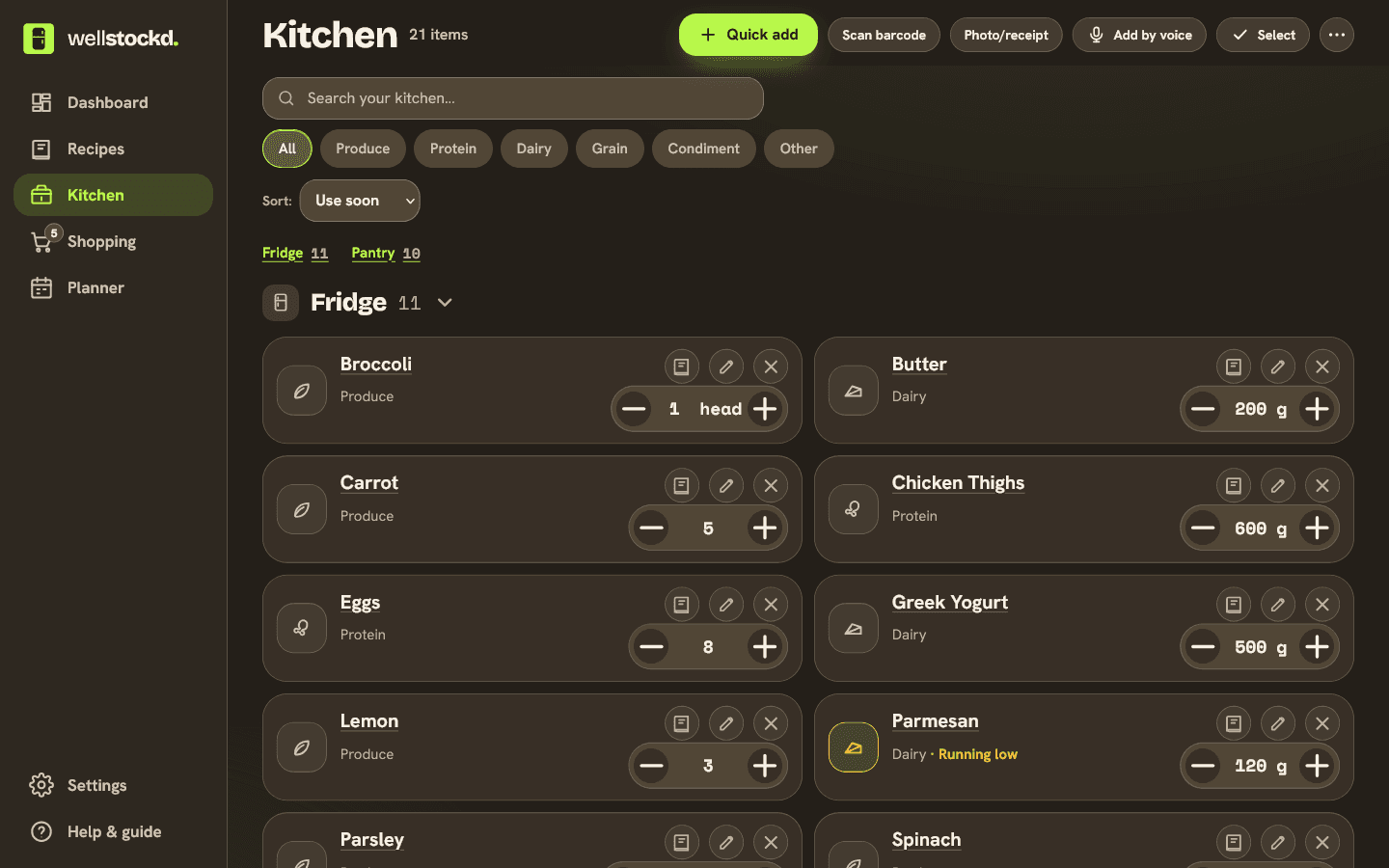
People mean three different things by "fridge restock software". The first is an app on your phone that counts what you have and writes the list for you. The second is a delivery service that brings groceries, sometimes all the way into the fridge. The third is a smart fridge with a camera inside. This guide covers all three for a home kitchen. If you landed here looking for software to run an office drinks fridge or a vending fridge, that is a different product, and none of these will do it well.
How we compared
We read each app's own store listing, website or help pages in November 2026 and noted four things: how it learns that something is low, whether it adds the item to your list without being asked, what the free version allows, and what the paid version costs. We did not test the delivery service or the fridge ourselves. Prices and features change, so check the linked pages before you pay for anything.
Fridge restock apps at a glance
| App | How it knows you are low | Adds to your list for you | Free version | Paid |
|---|---|---|---|---|
| Well Stockd | A minimum you set per item, a running-low flag on measured amounts, and a question when something runs out | Yes, when an item drops below your minimum | Free forever for up to 30 foods (plans) | Pro lifts the 30-food limit |
| Pantry Check | Your inventory and how fast you use things | It generates a list you trim | Up to 200 items | Premium (2,000 items) and Pro (10,000 items), sold in the app |
| KitchenPal | Items you recently finished, are running low on or buy often | It suggests, you add | Up to 100 items and 50 barcode scans | $3.99 a month, $14.99 a year or $29.99 once |
| Grocy | A minimum stock amount per product | Yes, below the minimum | Free and open source, on a computer you run | No paid plan |
| Walmart InHome | It is a delivery service, not a counter | You order, a Walmart associate puts it away | 30-day trial | $19.95 a month or $138 a year, $35 order minimum |
| Samsung AI Family Hub+ | A camera that recognizes 37 fresh foods | You add to its list or set up reorders through Alexa | Comes with the fridge | The price of the fridge |
Well Stockd: a minimum on each item, and a question when you run out
We make Well Stockd, so weigh our ranking with that in mind. Here is what it does today, and where it falls short.
Open any food in your kitchen and fill in "Keep at least". The app's own hint says it plainly: "When you have less than this, it goes on your shopping list." Set 6 on eggs or 2 on yogurt, and the next time you use some and drop under that number, the item is added and a short message tells you so. It works for counts like eggs and for amounts like grams or cups.
When you mark food as used or tossed, step its amount down to zero, or answer "Gone" in the Fridge check, the app asks "Add milk to your shopping list?" with two buttons, Add to list and Not now. Not now gets more use than you would think, since plenty of what runs out is food you never meant to buy again.
Measured amounts also get flagged as running low when they get small: under about 150 grams, 4 ounces or 1 cup. Each flagged row has a one-tap Add to list, and you can tick several rows and add them all at once. Single items like "3 onions" are never flagged, which is why the minimum is the better tool for anything you count.
None of this works if the count drifts, so the app updates it at the two moments it usually goes wrong. After the shop, you tick items off in the store, then Put away files them into the kitchen after a quick review. A receipt photo, or a Walmart or Target order email you forward, adds a shop the same way. After cooking, the finish screen in cook mode asks you to confirm what you used, and the kitchen goes down by that much.
The list opens and checks off in the store without a signal and syncs when you are back online. You can send it to a Walmart or Kroger cart, where you check each product match and then pay on the store's own site. The free plan shares a separate list with one other person; Pro shares the whole kitchen with up to six people. It runs in the browser, so there is nothing to install.
Where it does not win:
- It never orders anything on its own. You still shop, or send a cart and check out yourself.
- There is no camera in your fridge. The count is only as good as what gets recorded, so a week of not marking things used will leave it wrong.
- Free holds 30 foods. That covers the staples you restock most, but it is smaller than KitchenPal's 100 items or Pantry Check's 200, and a full pantry and freezer will need Pro.
- It does not learn how fast you go through milk. You set the minimum; Pantry Check says it works that out from your usage.
Set a Keep at least on the five things you always run out of, and let the list fill itself. Free keeps up to 30 foods, and a 7-day Pro trial starts when you confirm your email, no card needed. Start the free trial
Pantry Check: a list built from how fast you use things
Pantry Check is the closest thing to an app that restocks by habit. Its help page describes the auto-generated list this way: "Pantry Check analyzes the inventory and usage patterns and automatically generates a shopping list." The same page is honest about how it behaves: the app "is conservative and errs on the side of adding more items, so the users mostly need to pare-down the generated list." If you start a list from scratch instead, it shows a Restock Suggestions section.
In the store it records prices and a running total, and when you check out the list it updates the inventory. The free version tracks up to 200 items. Bigger storage tiers, Premium at 2,000 items and Pro at 10,000, are sold as in-app purchases, listed on the App Store at prices from $1.99 to $29.99 depending on the option. We checked the iPhone listing.
Pick it if you would rather the app guess than set minimums yourself, and you do not mind deleting a few extras from each list.
KitchenPal: suggestions from what you finished
KitchenPal's Google Play listing promises "automated recommendations based on your pantry inventory tracker [recently finished, running low, frequently bought]" and lets you "easily move items from the pantry to your shopping list." It also tracks expiry dates, scans barcodes and suggests recipes from what you have.
The free plan holds up to 100 items in your kitchen, with 50 barcode scans and 20 photo detections. Premium removes the scan limit and adds custom storage spaces and unlimited meal planning. It costs $3.99 a month, $14.99 a year, $29.99 once, or $39.99 once for a family. It runs on Android, iPhone and a web version that is still in beta.
It is the better fit if you want more free room than Well Stockd gives and you are happy to approve suggestions rather than have items added for you.
Grocy: minimum stock amounts, if you will run a server
Grocy is free, open source, and runs on a computer you control. Its home page puts the restock idea in one line: "Define minimum stock amounts of your loved products and never think about 'do I need noodles or are there enough at home?'." It can group products by the order you walk the supermarket, scans barcodes in the browser, and adds a recipe's missing ingredients to the shopping list.
The catch is the setup. You install it yourself, with a Windows desktop version, a Docker image or a Home Assistant add-on to choose from, and the site notes the web app works "without providing any offline usage capabilities", which matters in a store with no signal. It suits people who already run a home server and enjoy tinkering.
Walmart InHome: delivery into your fridge, not an app that counts
Walmart InHome is the service the "fridge restock" news stories were about. A Walmart associate brings the order inside and can put it away "neatly in your fridge". It costs $19.95 a month or $138 a year after a 30-day free trial, with a $35 order minimum.
In January 2024, CBS News reported that Walmart announced "InHome Replenishment", a feature meant to study Walmart+ members' habits and place orders automatically before they run out. The InHome page we checked in November 2026 does not mention it, so do not count on it until Walmart's own page does. Either way, InHome does not know what is in your fridge. It knows what you ordered.
Samsung AI Family Hub+: a camera inside the fridge
If you are buying a new fridge anyway, Samsung's AI Family Hub+ models have a camera called AI Vision Inside. Samsung's footnote is specific: it "can recognize and automatically label 37 unobscured fresh food items such as select fruits and vegetables; other items may be manually labeled." You can look inside from your phone, add items to a shopping list, and with Alexa built in, "set up smart reorder".
That is the most automatic option here, and the most expensive, because it is a refrigerator. It also covers only the fridge, not the pantry or the chest freezer in the garage.
Which fridge restock app should you pick
| If you want | Pick |
|---|---|
| Items added to the list for you, from minimums you set | Well Stockd |
| The app to guess from your habits | Pantry Check |
| 100 items free and suggestions you approve | KitchenPal |
| Minimums with no subscription, and you run a server | Grocy |
| Not to shop at all | Walmart InHome, where it is offered |
| A fridge that sees its own shelves | Samsung AI Family Hub+ |
How to set restock points that actually work
It is tempting to set a minimum on everything, and that is the quickest way to stop trusting the list. A few rules keep it useful.
Set minimums only on the food you always want in the house: milk, eggs, butter, bread, yogurt, the one sauce everyone uses. Leave the rest to the "Add to your shopping list?" question, where you can say Not now.
Pick a number that lasts until your next shop, not a number that feels tidy. If you shop on Saturdays and go through a dozen eggs a week, a minimum of 2 means you are out by Wednesday. Six is closer.
Record what you use when you cook. The minimum only fires when the count goes down, and the finish screen in cook mode does that for you.
If your restock problem is really buying things you already have, the guide on how to stop overbuying groceries goes further, and our comparison of pantry apps that stop duplicate buys looks at the same apps from that side. For dates rather than counts, see the apps that track food expiration dates, and for the wider field, our fridge inventory app comparison.
Want the list to write itself from what you actually use? Try it on your own fridge. Start the free trial
Frequently asked questions
What is fridge restock software?
For a home kitchen, it is an app that keeps a count of what is in your fridge and adds an item to your shopping list when it runs low or runs out. Some apps add it when you drop below a minimum you set (Well Stockd, Grocy); others guess from your usage (Pantry Check). Delivery services and smart fridges with cameras are sold under the same words.
Is there an app that adds groceries to my list when I run out?
Yes. Well Stockd adds an item when it drops below the "Keep at least" amount you set, and asks whether to add anything you mark as used up. Grocy does the same with minimum stock amounts. Pantry Check builds a whole list from your usage, and KitchenPal suggests items you finished.
Can my fridge tell me what I need to buy?
Some can. Samsung's AI Family Hub+ fridges recognize 37 fresh foods with a camera inside and can add items to a shopping list. Everything else has to be labelled by hand, and the camera does not see your pantry.
Is there a free fridge restock app?
Grocy is free with no paid plan, but you host it yourself. Well Stockd is free forever for up to 30 foods, and its minimums and restock questions are part of the free plan. Pantry Check is free for up to 200 items and KitchenPal for up to 100.
Does Well Stockd order groceries for me?
No. It writes the list and can send it to a Walmart or Kroger cart, where you check the matches and pay on the store's site. Nothing is ordered on a schedule.
Sources:
- Grocy home page
- Pantry Check help: Grocery Shopping
- Pantry Check on the App Store
- KitchenPal on Google Play
- KitchenPal pricing FAQ
- Walmart+ InHome
- CBS News: Walmart says it will use AI to restock customers' fridges (January 10, 2024)
- Samsung Family Hub overview
Competitor details checked November 3, 2026.