Freezer inventory whiteboard: a step-by-step setup guide
A freezer inventory whiteboard turns a frost-covered mystery box into a system you check: mount a dry-erase board, zone it to match your freezer, and update it the second something goes in or out. The setup below walks through it step by step, plus a real storage-times table.
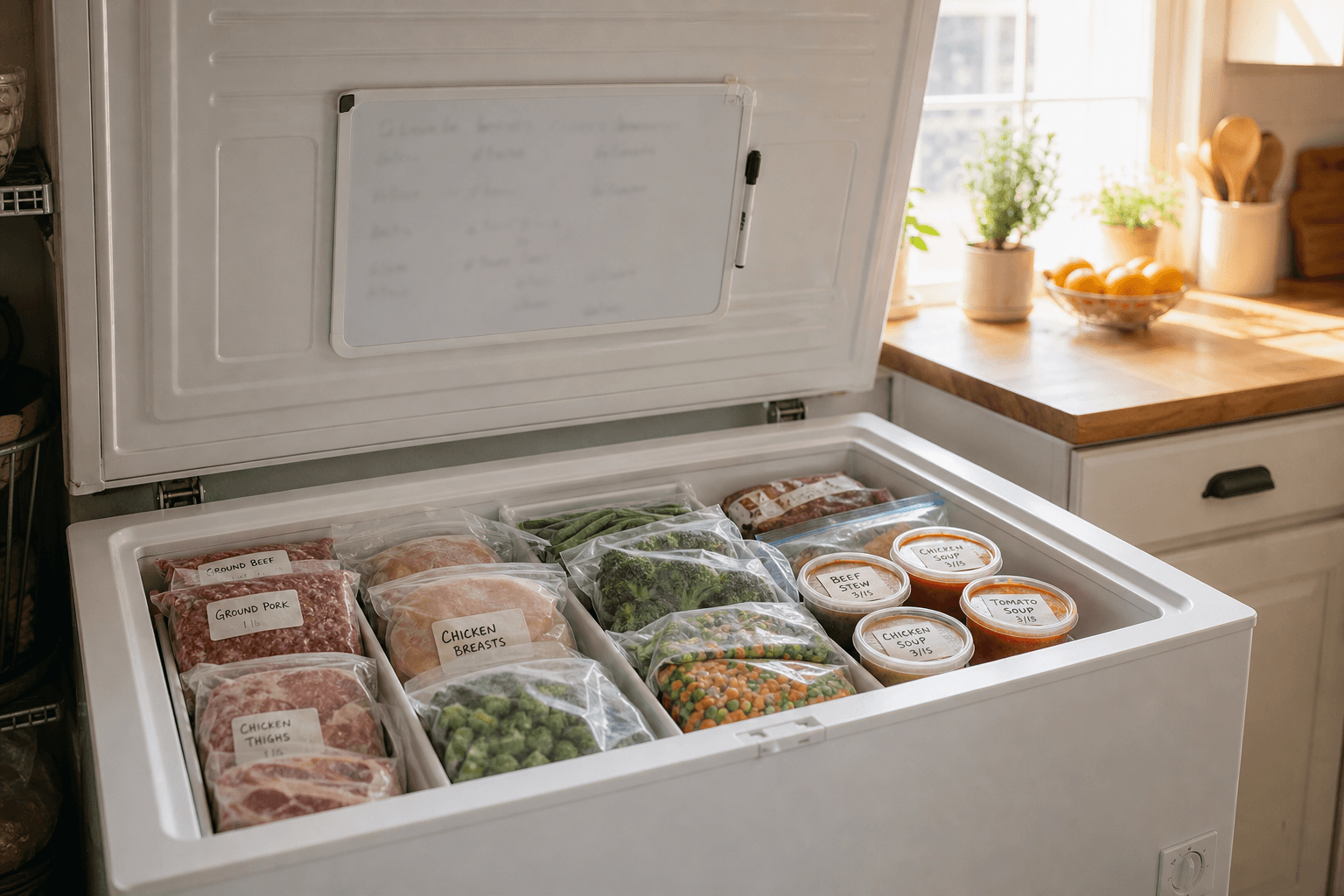
A freezer inventory whiteboard is a dry-erase board mounted on or near your freezer that lists what's inside, when it went in, and where to find it, updated the moment something goes in or comes out. Mount it with removable strips, split it into zones, and cross items off immediately, not later.
It sounds almost too simple to matter, but a freezer is the one part of the kitchen you can't see into at a glance. Everything's wrapped in the same white freezer paper or stacked three bags deep, so things get buried, forgotten, and eventually thrown out freezer-burned. A whiteboard fixes that by putting the contents on the outside, where you'll look at them. It's a low-tech cousin of a full kitchen inventory system, scoped down to the one appliance that causes the most "what even is this" moments.
What you need before you start
- A dry-erase whiteboard, magnetic notepad, or even a laminated index card taped to the lid
- A way to attach it: magnets for an upright freezer door, removable adhesive strips (like Command strips) for a chest freezer lid or the side of an upright, or a magnet clip and string if the surface won't hold tape
- A fine-tip dry-erase marker, plus a permanent marker for zone labels that shouldn't get wiped off by accident
- Five minutes to take stock of what's in there right now, before you write anything down
None of this needs to be fancy. A three-dollar whiteboard from the dollar store does the same job as a designer magnetic tracker with printed columns. The system matters more than the product.
How to set up a freezer inventory whiteboard, step by step
- Pick your surface and mount it somewhere you'll see it. For an upright freezer, the door itself works. For a chest freezer, the inside of the lid is better than the outside, since you'll see it every single time you open the freezer rather than only when you walk past it.
- Map your zones before you write a single item. Divide the board into sections that match how your freezer is physically organized: left basket, right basket, bottom layer, door shelves, whatever's true for your freezer. A flat list of forty items in no particular order is useless once you're standing there digging through frost.
- Do one full inventory pass. Open every bin and bag, and write each item under its zone with a rough date and quantity, for example "ground beef x3, in 6/28" or "chicken thighs x2, in 7/2." You don't need exact weights, just enough to know what you're working with.
- Update it in real time, not on a schedule. The whole system fails the moment you tell yourself you'll "add it later." Keep the marker clipped to the board so updating takes five seconds, the same five seconds it takes to close the lid.
- Erase or cross off the second an item is gone, not when you next tidy up. A whiteboard that's a week behind is worse than no whiteboard, because it tells you something's there that isn't.
- Reset monthly. Once a month, wipe the whole board and redo the inventory pass. This catches anything that slipped through the cracks and keeps the board honest instead of slowly drifting out of sync with reality.
How long will things last back there?
Writing a date next to each item only helps if you know roughly how long it's good for. Food kept continuously at 0°F stays safe to eat indefinitely, so none of the numbers below are safety cutoffs. They're quality windows: how long something stays at its best before texture, flavor, or color starts to slip.
| Food | Freezer quality window at 0°F |
|---|---|
| Ground meat (beef, turkey, pork, lamb) | 3 to 4 months |
| Steaks | 6 to 12 months |
| Pork chops and roasts | 4 to 12 months |
| Whole chicken or turkey | 9 to 12 months |
| Chicken pieces | 9 months |
| Bacon and sausage | 1 to 2 months |
| Soups, stews, and casseroles | 2 to 3 months |
| Bread and baked goods | 2 to 3 months |
| Vegetables and fruit, properly packaged | 8 to 12 months |
Jot the "use by" month straight onto the whiteboard next to each entry, and you'll never have to guess whether that mystery bag of ground turkey is still worth cooking.
Whiteboard, magnet tracker, or app: which one fits you?
A whiteboard shines when one person manages one freezer they walk past daily. It's free, instant, and needs no charging. It breaks down in a few common situations: a second freezer in the garage or basement that nobody passes on the way to anything, a household where three different people update the freezer and only one remembers to touch the board, or a chest freezer buried under a coat closet where you genuinely forget the board exists.
If any of that sounds familiar, a phone-based tracker fills the gap a wall board can't, since everyone in the house can update it from wherever they are, and it can nudge you before something ages out of its quality window instead of relying on you to notice. Well Stockd works this way for the whole kitchen, not just the freezer, and it will tell you which recipes you can already make with what's on hand. A lot of households run both: the whiteboard for the fast glance while the freezer door is open, and a pantry inventory app for the shopping list and the "what can I cook tonight" question. Neither one replaces the habit of looking at what you have. They just make the habit easier to keep.
If you're setting this up for the fridge or pantry too, the same zone-and-date logic carries over. See how to keep track of food in your fridge and how to keep track of pantry inventory for the same method applied to the rest of the kitchen.
Frequently asked questions
Do I need a magnetic whiteboard, or will any dry-erase board work? Any dry-erase surface works as long as it's mounted somewhere you pass by regularly. Magnetic boards are convenient on an upright freezer door, but a laminated card and Command strips do the same job on a chest freezer lid, where magnets usually don't have anywhere to stick.
What if my freezer is in the garage and I forget to check the whiteboard? This is the one scenario where a whiteboard genuinely struggles, since you only see it when you're already standing in front of the freezer. A phone-based inventory app closes that gap because it's with you at the grocery store or when you're planning dinner, not just when you're in the garage.
How often should I update the whiteboard? Every single time you add or remove something, not on a weekly schedule. A board that's even a few days stale starts giving you wrong answers, which is worse than having no system at all. Pair that with a full monthly reset to catch anything that got missed.
Sources: